Before the Press Kit: How Showbiz Publicity Travelled
See how showbiz publicity moved from printed press kits to digital packages, and how distribution changed what journalists could gather and share.
The common mistake in comparing a printed press kit with a digital one is to treat the newer package as the same bundle delivered faster. In practice, showbiz publicity changed when distribution changed: editors could receive, select and circulate materials differently, while publicity teams could update what was available. The format shaped what a newsroom could gather, not just how it received it.
What did a printed showbiz press kit contain?
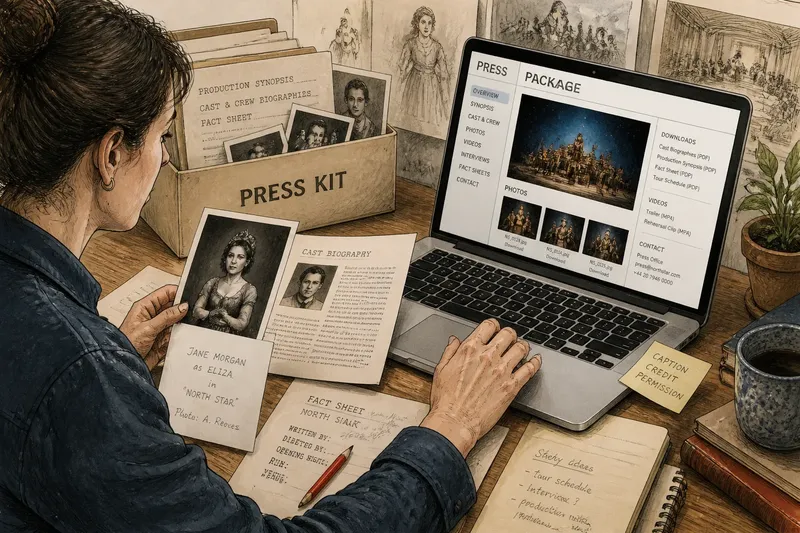
A printed press kit was a prepared collection of material assembled for journalists, editors, broadcasters or exhibitors. Depending on its purpose, it might include a production synopsis, cast and crew biographies, a fact sheet, publicity photographs, captions and a press contact. A film release, television programme, theatre production or performer could each have a different kind of packet.
The contents were physical and finite. A photograph might arrive as a glossy print, sometimes with a caption or identification on the reverse; written material could be typed or reproduced on paper. The recipient could file the pages, mark them up, pass them to a colleague or choose only a few items for publication. That handling made the kit a working desk object as much as a promotional statement.
Printed materials also required practical choices before distribution. Someone had to select images, prepare copy, assemble packets and send them to the intended contacts. A press kit therefore reflected both the publicity team's editorial priorities and the limits of what could be reproduced and transported conveniently.
How did printed publicity reach journalists?
It travelled through post, courier, hand delivery and press offices, with the route shaped by the production and the recipient. A journalist might collect material at a screening or press event, while a regional outlet could receive a packet by mail. Distribution took place through identifiable hand-offs: a publicity office prepared the material, a carrier moved it, and a newsroom received it.
That chain gave the sender some control over who was supplied and when. It also meant that an editor without a direct contact, a convenient delivery route or an available packet might have fewer materials to work with. A newsroom could request missing information, but a replacement print or document required another act of preparation and delivery.
Once a packet arrived, its contents could travel further inside a publication. A picture editor might select a photograph, a writer could use a biography, and a sub-editor might retain a fact sheet for later reference. The original bundle did not dictate what would appear, but its physical contents made the available options visible at a glance.
What changed when press materials went online?
Digital distribution replaced the single delivered bundle with files that could be sent, downloaded or accessed through an online press area. A package might contain biographies, synopses, image files, captions, interview information, video clips and contact details. Instead of handling prints and pages, a newsroom could browse a list, preview a file and save selected items to a computer.
This changed the cost of supplying additional material in practical terms: a publicity team could make more files available without assembling and posting a separate physical packet for every recipient. A large image library, alternate approved photographs or several versions of a synopsis could sit in the same online collection. The recipient still had to find and assess each file, but the physical size of an envelope no longer set the same boundary.
Digital packages also made revision more straightforward. A contact detail, caption or release note could be replaced on a press page, whereas a printed sheet already sent remained in circulation. That flexibility created a new editorial concern: a downloaded file might be an older copy, and two people could hold different versions unless the page clearly identified current material.
How did digital delivery affect what a newsroom could gather and share?
It widened the set of materials a newsroom could inspect and made copying a selected item simpler. An editor could download a photograph, forward a link to a colleague or open a biography while preparing a story. A regional outlet could have access to the same online package as a larger publication, provided it knew where to find it and had permission to use the materials.
That broader availability did not mean every file was equally useful or ready for publication. A high-resolution image could be suitable for print but cumbersome to send by email; a small preview could look clear on screen yet be unsuitable for a page. Digital folders might also contain several crops, file formats or near-identical versions, making captions and filenames important clues rather than decorative details.
Sharing changed too. A printed photograph usually moved as an object or as a reproduction; a digital file could be copied quickly and detached from the press page that explained it. A caption or credit that appeared beside an image online might not travel with the downloaded file. Newsrooms therefore needed a clear internal habit for keeping usage notes and source information alongside saved assets.
Imagine a regional arts editor preparing a story about a touring production. The editor opens its online press package, saves a cast biography and two captioned photographs, then forwards the package link to a colleague rather than attaching a folder of files. The expected observable result is that both colleagues can consult the same source page and select material without waiting for a posted packet; they still need to check the caption and permitted use before publishing.
Who controls access to a digital press package?
The publicity office or rights holder usually decides where a package sits, what it contains and who can access it. Some press pages are open to anyone; others require a registration, password or direct request. A login can help a team manage sensitive or time-limited material, but it adds a step for a journalist who only needs a caption or a contact name.
Access can also depend on the platform. A link may lead to a press page, a cloud folder, a media library or a downloadable archive. Each arrangement affects how easily a newsroom can browse, locate a particular item and understand whether a file is current. A clear landing page with descriptive labels can save more time than an unstructured folder containing many files.
Availability and permission are not the same thing. A file being downloadable does not, by itself, explain the conditions for publication, credit or alteration. The package should make its usage terms easy to locate, and a journalist should ask the publicity contact if the relevant permission is unclear.
What should a journalist check before using a digital asset?
Check the source, context and intended use before an image, biography or clip leaves the press package. A quick review can prevent a newsroom from attaching the wrong caption, relying on an outdated biography or treating a promotional image as an unrestricted file.
- Source: Confirm that the file came from the official press page or a recognised publicity contact; if not, ask where it originated.
- Caption: Keep the supplied caption with the image and check that it describes the person, production and context accurately.
- Credit: Look for a photographer, agency or other credit line and carry it into the newsroom's publishing notes.
- Version: Check the filename, page note or accompanying message for signs that a file has been replaced or updated.
- Usage terms: Read the stated permissions for publication, cropping, credit and onward sharing, then ask the contact about anything unclear.
- File choice: Select a file suitable for the publication's format rather than assuming a screen preview will work for every use.
How can a journalist find older publicity material?
Start with the production's current publicity contact, official press page or distributor, then ask whether older materials remain available. A current page may hold only the latest package, while a publicity office may know where previous biographies, photographs or release documents were filed. State the production and the kind of item needed so the request can be directed efficiently.
For material already in a newsroom, search the publication's own records as well as email and shared drives. Useful clues include a production title, performer name, publicity contact, caption wording or an image credit. Consistent filenames and saved source notes make these records easier to distinguish from files copied from an unknown location.
Older print and digital materials can differ in what they preserve. A paper packet may include a caption or contact detail written directly on a print; a downloaded image may have no such context unless the newsroom saved the accompanying text. Treat the file and its identifying information as a pair when filing or passing it to a colleague.
Are digital press kits replacing printed publicity?
Digital packages have become a practical way to distribute material, but printed publicity can still serve particular events and recipients. A physical handout may be convenient at a screening, performance or press gathering, while an online page can hold files that recipients need to access later. Publicity teams may use both, with the paper item pointing journalists towards a fuller digital collection.
The useful comparison is not that one format is always better. Print makes a bounded, tangible selection; digital distribution can offer more items, faster updates and easier copying, while asking users to manage links, versions, permissions and file context. Each format can influence what gets noticed and what is passed along.
What do digital press packages change most?
The biggest shift is that publicity travels as a collection of accessible files rather than only as a prepared packet moving from sender to recipient. That gives journalists more choice about what to gather and makes it easier for colleagues to share selected material. It also makes source, version and usage notes easier to separate from the asset unless someone keeps them together.
When assessing how showbiz publicity travelled, look beyond the medium to the route and the work it asks of both sides. A well-labelled printed kit and a carefully organised digital package each help a newsroom identify usable material; a clear source, caption and permission note help that material remain understandable as it moves from press office to publication.